Definition
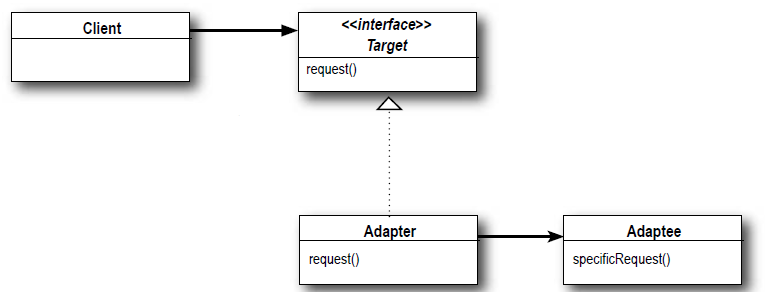
The Adapter Pattern converts the interface of a class into another interface the client expects. Adapter lets classes work together that couldn’t otherwise because of incompatible interfaces.

Figure 01. Class diagram Adapter Pattern. Ref: Heads First Design Patterns
Scenario
The inventory system of a store displays all the products that are in stock and the system is working perfectly fine.
A new requirement comes to extend the functionality of the inventory system to display all the products of other store that was just acquired and needs to be integrated to our inventory system. This other store also have Product objects though the properties of them is different than the Products that the current inventory system use.
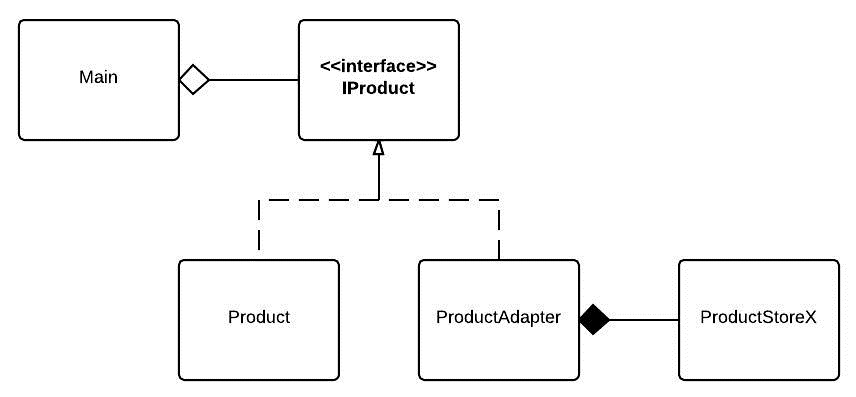
To integrate the Product objects of the other store to our Inventory system we will apply the Adapter Pattern as shown in the next figure:

Figure 02. Class diagram of the solution proposed.
As can be seen in the class diagram of the previous figure, the class ProductAdapter that extends the interface IProduct, will adapt the product objects of the other store (ProductStoreX), to the IProduct types that are expected by the Client (Main class), in the following way:
ProductStoreX,java
package chris.desingpatterns.adapter.products;

import chris.desingpatterns.adapter.productsadapter.ProductStoreX;

/**
 * Adapter that will adapt products from
 * another store so they can be displayed
 * with the same logic of the products of
 * the current store.
 *
 * @author croman
 *
 */
public class ProductStoreXAdapter implements IProduct {
   private ProductStoreX product;

   public ProductStoreXAdapter(ProductStoreX product) {
      this.product = product;
   }

   public String getName() {
      return product.getProductName();
   }

   public String getId() {
      return product.getProductSerialNumber();
   }

   /**
    * The price of a product in the other store is returned
    * as a String, but the products of the current store are
    * primitives type double, this method will convert the
    * string to type double.
    */
   public double getPrice() {
      Double price = Double.parseDouble(product.getPrice());
      return price;
   }

   /**
    * The products of the other store are categorized by different groups
    * than the ones that are used in the prodcuts of the current system,
    * for this reason, this method will convert the groups of the products
    * of the other store to  ProductCategory enums.
    *
    */
   public ProductCategory getCategory() {
      //Groups: TV, RADIO, TELEPHONE, LAPTOP, APPLIANCES
      String group = product.getProductGroup();
      ProductCategory category;

      if(group.equals("RADIO")){
         category = ProductCategory.HIFI;
      } else if(group.equals("TELEPHONE")){
         category = ProductCategory.MOBILE;
      } else if(group.equals("LAPTOP")){
         category = ProductCategory.COMPUTER;
      } else {
         category = ProductCategory.GENERAL;
      }

      return category;
   }

}
As can be seen in the previous snippet, all the methods that are not equivalent to the methods expected by the Client class, as getCategory() and getPrice(), have an extra logic that will make them alike.
The interface that has all the methods that will be used by the Client is:
IProduct.java
package chris.desingpatterns.adapter.products;

/**
 * Generic interface that will expose
 * all the information that need to
 * be displayed in a user interface.
 *
 * @author croman
 *
 */
public interface IProduct {

   String getName();

   String getId();

   double getPrice();

   ProductCategory getCategory();

}
And the client that will, in this case, display all the products in stock, is:
Main.java
package chris.desingpatterns.adapter;

import java.util.ArrayList;
import java.util.List;

import chris.desingpatterns.adapter.products.IProduct;
import chris.desingpatterns.adapter.products.ProductStoreXAdapter;
import chris.desingpatterns.adapter.products.ProductsGenerator;
import chris.desingpatterns.adapter.productsadapter.ProductStoreX;
import chris.desingpatterns.adapter.productsadapter.ProductStoreXGenerator;

public class Main {

   public static void main(String ... args){
      List<IProduct> products = ProductsGenerator.getAllProducts();

      System.out.println("Products from the store:");
      productDisplayer(products);

      // Adapt the products from the other store to products
      // of this store.
      List<ProductStoreX> productsStoreX = ProductStoreXGenerator.getAllProducts();
      List<IProduct> productsAdapted = adaptProdustsStoreXToProducts(productsStoreX);
      products.addAll(productsAdapted);

      System.out.println("Products from the store X + products from our store:");
      productDisplayer(products);

   }

   /**
    * Method that will adapt product types ProductStoreX
    * to IProduct.
    *
    * @param productsStoreX
    * @return
    */
   private static List<IProduct> adaptProdustsStoreXToProducts(List<ProductStoreX> productsStoreX){
      List<IProduct> products = new ArrayList<IProduct>();

      for(ProductStoreX productX : productsStoreX){
         ProductStoreXAdapter productAdapted = new ProductStoreXAdapter(productX);
         products.add(productAdapted);
      }

      return products;
   }

   /**
    * Method that will print the information of all the products
    * that are present in the store.
    *
    * @param products
    */
   private static void productDisplayer(List<IProduct> products){
      List<IProduct> generalProducts = new ArrayList<IProduct>();
      List<IProduct> computerProducts = new ArrayList<IProduct>();
      List<IProduct> hifiProducts = new ArrayList<IProduct>();
      List<IProduct> mobileProducts = new ArrayList<IProduct>();

      for(IProduct product : products){
         switch(product.getCategory()){
         case COMPUTER:
            computerProducts.add(product);
            break;
         case HIFI:
            hifiProducts.add(product);
            break;
         case MOBILE:
            mobileProducts.add(product);
            break;
         default:
            generalProducts.add(product);
         }
      }


      System.out.println("********************************");
      System.out.println("********************************");
      System.out.println("PRODUCTS IN STORE:");
      System.out.println("Computers:");
      for(IProduct p : computerProducts){
         printProductInfo(p);
      }

      System.out.println("Mobile Phones:");
      for(IProduct p : mobileProducts){
         printProductInfo(p);
      }

      System.out.println("HIFI Products:");
      for(IProduct p : hifiProducts){
         printProductInfo(p);
      }

      System.out.println("Products in General:");
      for(IProduct p : generalProducts){
         printProductInfo(p);
      }
      System.out.println("********************************");
      System.out.println("********************************");
   }

   private static void printProductInfo(IProduct p){
      System.out.println(" + " + p.getName() + " ["+p.getId()+"] : "
                     + p.getPrice() + "€");
   }


}
As can be seen in the Main class, both Product objects (Product and ProductStoreX) can be threated the same way, without changing the logic to print the information about them.
That is it!
To download the code click in the following link:
Adapter Pattern
Do you have any recommendations or amendments to be done, please let me know to improve this post!


 Design Patterns in Java