Definition
The Decorator Pattern attaches additional responsibilities to an object dynamically. Decorators provide a flexible alternative to subclassing for extending functionality.

Figure 01. Decorator Pattern class diagram. Ref: http://en.wikipedia.org/wiki/Decorator_pattern
Scenario
Crazy Phones (a mobile phone company provider) wants a web shop on which its customers can choose any of all the offers that they have on mobile services. For now they have the following offers:
- SIM only plans, where customers can make and receive calls.
- SMS plans, where customers can send and receive sms’s.
- Internet, where customers can also have internet in their phones.
One of the main requirements is that these plans can be combined, something like: SIM + SMS, SIM + Internet, etc, being SIM only the mandatory basic plan (no SIM no calls, no sms’s, no internet… makes sense  )
)
Another important requirement is that the plans can change from time to time, so the design has to be flexible to changes.
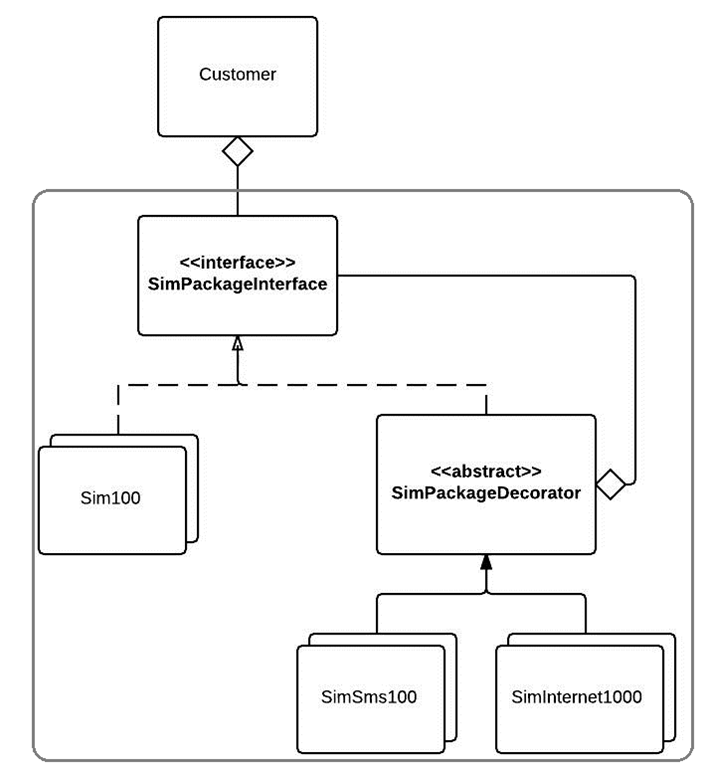
For this scenario, we could propose the following solution:

Figure 02. Class diagram of the solution proposed for this scenario.
As it can be seen in this diagram we will apply the Decorator Pattern, because this pattern fits perfectly well on the requirements specified.
- Easy to extend to different types of plans (SimSms500, Sim1000, Internet 2GB, etc)
- The MOST IMPORTANT, the basic plan (SimXXX) can be decorated with other plans on it.
This can be better understood checking the code implemented.
Lets first check the SimPackageInterface:
SimPackageInterface.java
package chris.desingpatterns.decorator.sim;

public interface SimPackageInterface {

    /**
     * Method that will return the name of the
     * SIM Package plan.
     * @return
     */
    String getName();

    /**
     * Method that will return the description
     * of the package plan.
     *
     * @return
     */
    String getDescription();

    /**
     * Method that will return the cost
     * for the SIM Plan.
     * @return
     */
    double getCost();

}
This interface is the one that expose all the required methods for a SIM plan object.
The decorator looks like this:
SimPackageDecorator.java
package chris.desingpatterns.decorator.sim.decorators;

import chris.desingpatterns.decorator.sim.SimPackageInterface;

public abstract class SimPackageDecorator implements SimPackageInterface {
    private SimPackageInterface simPackage;

    /**
     * With this constructor we will force all the
     * classes that extend it, to set a Sim Package
     * class to decorate it.
     *
     * @param simPackage
     */
    public SimPackageDecorator(SimPackageInterface simPackage){
        this.simPackage = simPackage;
    }

    public SimPackageInterface getSimPackage() {
        return simPackage;
    }

}
The Decorator (as the pattern describes it) will need the class that needs to be decorated (in this case any class that implements the SimPackageInterface)
One of the classes that extend the decorator is the SimInternet500 class, this class will Decorate any class that extends the SimPackageInterface to add an extra Internet service to the SIM plan.
SimInternet500.java
package chris.desingpatterns.decorator.sim.decorators.internet;

import chris.desingpatterns.decorator.sim.SimPackageInterface;
import chris.desingpatterns.decorator.sim.decorators.SimPackageDecorator;

public class SimInternet500 extends SimPackageDecorator {

    public SimInternet500(SimPackageInterface simPackage) {
        super(simPackage);
    }

    /**
     * {@inheritDoc}
     */
    public String getName() {
        return getSimPackage().getName() + " + Internet 500";
    }

    /**
     * {@inheritDoc}
     */
    public String getDescription() {
        return getSimPackage().getDescription() +
                " + 500 MB of internet at max 2 Mbps";
    }

    /**
     * {@inheritDoc}
     */
    public double getCost() {
        return getSimPackage().getCost() + 10.00;
    }

}
This class attach additional information (methods: getName() and getDescritpion()) and additional functionality (creating an extra calculation of prices in getCost()) thanks to the use of the Decorator pattern without changing or extending the classes that directly extend the interface SimPackageInterface.
The class that is running this scenario is:
Main.java
package chris.desingpatterns.decorator;

import chris.desingpatterns.decorator.sim.Sim100;
import chris.desingpatterns.decorator.sim.Sim200;
import chris.desingpatterns.decorator.sim.SimPackageInterface;
import chris.desingpatterns.decorator.sim.SimUnlimited;
import chris.desingpatterns.decorator.sim.decorators.internet.SimInternet500;
import chris.desingpatterns.decorator.sim.decorators.internet.SimInternetUnlimited;
import chris.desingpatterns.decorator.sim.decorators.sms.SimSmsUnlimited;

public class Main {

    /**
     * In this example we will have three customers
     *
     * - Customer A just needs to do calls all the time (SIM Unlimited)
     * - Customer B order a SIM for calling (SIM 200) +
     *   Unlimited SMS's + Internet 500
     * - Customer C wants more Internet than anything else Unlimited
     *      Internet, so he choose the basic calls plan (SIM 100).
     *   He does not need SMS's because he will use Internet to send SMS's
     *
     * @param args
     */
    public static void main(String[] args) {

        //Customer A
        Customer customerA = new Customer("Christian");
        SimPackageInterface simUnlimited = new SimUnlimited();
        customerA.setSimPackage(simUnlimited);
        printInfo(customerA);

        //Customer B
        Customer customerB = new Customer("Alejandro");
        SimPackageInterface sim200 = new Sim200();
        sim200 = new SimSmsUnlimited(sim200);
        sim200 = new SimInternet500(sim200);
        customerB.setSimPackage(sim200);
        printInfo(customerB);

        //Customer C
        Customer customerC = new Customer("Marcelo");
        SimPackageInterface simInternet = new Sim100();
        simInternet = new SimInternetUnlimited(simInternet);
        customerC.setSimPackage(simInternet);
        printInfo(customerC);

    }

    /**
     * Method that will print the customer info
     * + the SIM package that he chose.
     *
     * @param customer
     */
    private static void printInfo(Customer customer) {
        SimPackageInterface simPackage = customer.getSimPackage();
        System.out.println("=========================================");
        System.out.println(customer.getName() + " ordered: ");
        if(simPackage != null){
            System.out.println("- Name of the package: " +
                                simPackage.getName());
            System.out.println("- The description: " +
                                simPackage.getDescription());
            System.out.println("- The cost: " +
                                simPackage.getCost() + " Euros");
        }
        System.out.println("=========================================");

    }

}
That is it!
Starting a new mobile phone contract or renewing an existing one usually will give you these options to select the contract that best fits your necessities… so there we have here an application of the Decorator Pattern to fulfill these requirements.
Do you want to run the code by yourself? Then download the source code here:
Decorator Pattern
Do you have any recommendations or amendments to be done, please let me know to improve this post!


 Design Patterns in Java