Template method pattern

Definition

The Template Method Pattern defines the steps of an algorithm and allow subclasses to provide the implementation for one or more steps.

templatemethod1

Figure 01. Class diagram Template method pattern. Ref.:http://programmersnotes.info/2009/03/03/difference-between-adapter-and-template-method-pattern/

Scenario

A telecommunication provider wants to automate its order process. For now the telecommunication provider offers internet and telephony service and they may offer in the future cable, or any other type of services.

To present a solution to this requirement, it was noticed that the order generation for telephony and internet were almost similar with small differences, is for this reason that for the order generation, the Template method pattern fits properly and as a plus, this design pattern is very flexible to add in the future other kind of offers that the telco provider may want to add.

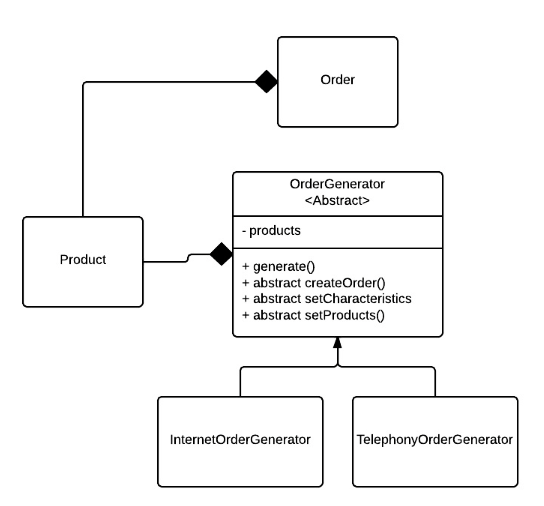
The class diagram to generate orders is as shown in the next picture:
Template1

Figure 02. Template pattern applied to the order generation.
Template2

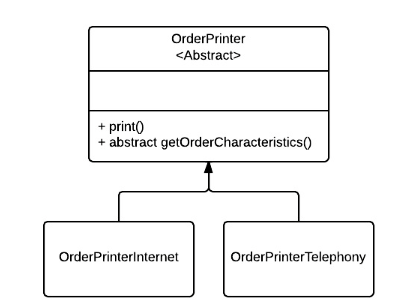
Figure 03. Template pattern applied to a simple Order printer to test the implementation.

Talking about the first Template pattern example, the classes InternetOrderGenerator and TelephonyOrderGenerator do almost the same thing with small differences, is for this reason that generalizing the common steps in the abstract class OrderGenerator, and by this way applying the Template Method pattern, is the best way to go and as a plus this pattern is flexible to extending this order generation to other kind of services that may come in the future.

The code of the abstract class is as follows:

OrderGenerator.java

package chris.designpatterns.template;

import java.util.List;
import java.util.Random;

import chris.designpatterns.template.model.Order;
import chris.designpatterns.template.model.Product;

public abstract class OrderGenerator {
    protected List<Product> products;
    
    public Order generate() {
        Order order = createOrder();
        //First step: Add products from the basket
        setProducts();
        
        //set order particular characteristics
        setCharacteristics();
        
        //calculate price
        float total = priceCalculator();
        order.setCost(total);
        
        //generate order id
        int orderId = generateId();
        order.setId(orderId);
        
        return order;
    }
    
    public abstract Order createOrder();
    public abstract void setCharacteristics();
    public abstract void setProducts();      

    private int generateId() {
        return new Random().nextInt(100000000);
    }

    private float priceCalculator() {
        float total = 0;
        for(Product p : products){
            total += p.getPrice();
        }   
        return total;
    }
}


The subclasses are simpler because a big part of the logic is done in the template abstract class.

TelephonyOrderGenerator.java

package chris.designpatterns.template;

import java.util.ArrayList;

import chris.designpatterns.template.model.Order;
import chris.designpatterns.template.model.Product;
import chris.designpatterns.template.model.TelephoneProduct;
import chris.designpatterns.template.model.TelephonyOrder;
import chris.designpatterns.template.model.TelephonyPlanProduct;

public class TelephonyOrderGenerator extends OrderGenerator {
    private TelephoneProduct telephone;
    private TelephonyPlanProduct plan;
    private TelephonyOrder order;
    
    
    public TelephonyOrderGenerator(TelephoneProduct telephone, 
TelephonyPlanProduct plan){
        this.telephone = telephone;
        this.plan = plan;
    }

    @Override
    public void setCharacteristics() {
        TelephonyOrder telOrder = (TelephonyOrder) order;
        telOrder.setPhoneNumber(telephone.getNumber());
        telOrder.setPlanMinutes(plan.getMinutes());
    }

    @Override
    public Order createOrder() {
        this.order = new TelephonyOrder();
        
        return order;
    }

    @Override
    public void setProducts() {
        products = new ArrayList<Product>();
        products.add(telephone);
        products.add(plan);
        
        order.setProducts(products);
    }

}

InternetOrderGenerator.java

package chris.designpatterns.template;

import java.util.ArrayList;

import chris.designpatterns.template.model.InternetOrder;
import chris.designpatterns.template.model.InternetProduct;
import chris.designpatterns.template.model.Order;
import chris.designpatterns.template.model.Product;

public class InternetOrderGenerator extends OrderGenerator {
    private InternetProduct internet;
    private InternetOrder order;
    
    public InternetOrderGenerator(InternetProduct internet) {
        this.internet = internet;
    }

    @Override
    public void setCharacteristics() {
        order.setInternetSpeed(internet.getSpeed());
        order.setRouterBrand(internet.getRouterBrand());
    }

    @Override
    public Order createOrder() {
        order = new InternetOrder();
        return order;
    }

    @Override
    public void setProducts() {
        products = new ArrayList<Product>();
        products.add(internet);
        
        order.setProducts(products);
    }

}

Notice the way the abstract methods were implemented in both classes.

And the client that will test our implementation:

Main.java

package chris.designpatterns.template;

import chris.designpatterns.template.model.InternetFactory;
import chris.designpatterns.template.model.InternetProduct;
import chris.designpatterns.template.model.Order;
import chris.designpatterns.template.model.TelephoneFactory;
import chris.designpatterns.template.model.TelephoneProduct;
import chris.designpatterns.template.model.TelephonyPlanFactory;
import chris.designpatterns.template.model.TelephonyPlanProduct;
import chris.designpatterns.template.utility.OrderPrinter;
import chris.designpatterns.template.utility.OrderPrinterInternet;
import chris.designpatterns.template.utility.OrderPrinterTelephony;

public class Main {
         
    public static void main(String[] args) {
        Main main = new Main();
        //Telephony Order
        main.runTelephonyOrder();
        
        //Internet Order
        main.runInternetOrder();
    }

    private void runInternetOrder() {
        InternetProduct internet = InternetFactory.createProduct();
        internet.setRouterBrand("Cisco 3500");
        
        OrderGenerator orderGenerator = new InternetOrderGenerator(internet);
        Order order = orderGenerator.generate();
        
        OrderPrinter printer = new OrderPrinterInternet();
        printer.print(order);  
    }

    private void runTelephonyOrder() {
        TelephoneProduct telephone = TelephoneFactory.createProduct();
        telephone.setNumber("0652630233");
        
        TelephonyPlanProduct telephonyPlan = TelephonyPlanFactory.createProduct();
        
        OrderGenerator orderGenerator = new TelephonyOrderGenerator(telephone, 
telephonyPlan); 
        Order order = orderGenerator.generate();
        
        OrderPrinter printer = new OrderPrinterTelephony()
        printer.print(order);
    }
}

Another example of the implementation of the Template method pattern can be checked in the classes:

  • OrderPrinter
  • OrderPrinterInternet
  • OrderPrinterTelephony

The code of the full project is attached to this post.

Template Pattern

Hope you find it useful and as always, if you have any questions and/or recommendations, feel free to make them.
Adapter Pattern

Definition

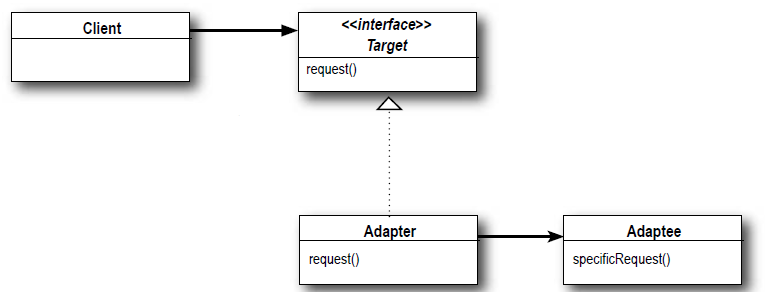
The Adapter Pattern converts the interface of a class into another interface the client expects. Adapter lets classes work together that couldn’t otherwise because of incompatible interfaces.

image

Figure 01. Class diagram Adapter Pattern. Ref: Heads First Design Patterns

Scenario

The inventory system of a store displays all the products that are in stock and the system is working perfectly fine.

A new requirement comes to extend the functionality of the inventory system to display all the products of other store that was just acquired and needs to be integrated to our inventory system. This other store also have Product objects though the properties of them is different than the Products that the current inventory system use.

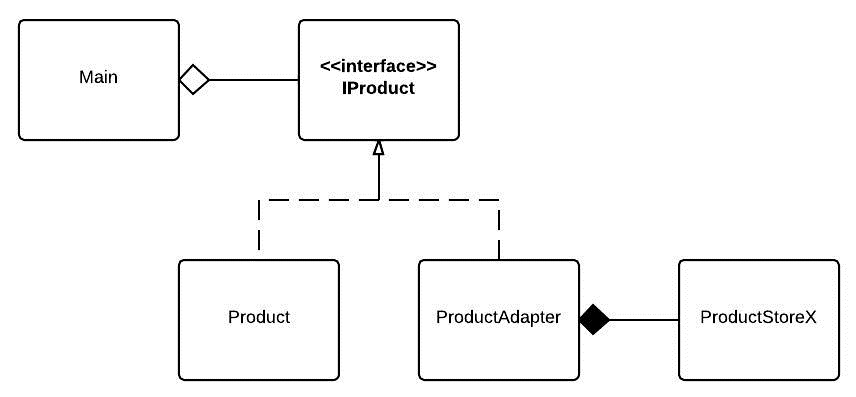
To integrate the Product objects of the other store to our Inventory system we will apply the Adapter Pattern as shown in the next figure:

AdapterPattern (1)

Figure 02. Class diagram of the solution proposed.

As can be seen in the class diagram of the previous figure, the class ProductAdapter that extends the interface IProduct, will adapt the product objects of the other store (ProductStoreX), to the IProduct types that are expected by the Client (Main class), in the following way:

ProductStoreX,java 

package chris.desingpatterns.adapter.products; import chris.desingpatterns.adapter.productsadapter.ProductStoreX; /** * Adapter that will adapt products from * another store so they can be displayed * with the same logic of the products of * the current store. * * @author croman * */ public class ProductStoreXAdapter implements IProduct { private ProductStoreX product; public ProductStoreXAdapter(ProductStoreX product) { this.product = product; } public String getName() { return product.getProductName(); } public String getId() { return product.getProductSerialNumber(); } /** * The price of a product in the other store is returned * as a String, but the products of the current store are * primitives type double, this method will convert the * string to type double. */ public double getPrice() { Double price = Double.parseDouble(product.getPrice()); return price; } /** * The products of the other store are categorized by different groups * than the ones that are used in the prodcuts of the current system, * for this reason, this method will convert the groups of the products * of the other store to ProductCategory enums. * */ public ProductCategory getCategory() { //Groups: TV, RADIO, TELEPHONE, LAPTOP, APPLIANCES String group = product.getProductGroup(); ProductCategory category; if(group.equals("RADIO")){ category = ProductCategory.HIFI; } else if(group.equals("TELEPHONE")){ category = ProductCategory.MOBILE; } else if(group.equals("LAPTOP")){ category = ProductCategory.COMPUTER; } else { category = ProductCategory.GENERAL; } return category; } }

As can be seen in the previous snippet, all the methods that are not equivalent to the methods expected by the Client class, as getCategory() and getPrice(), have an extra logic that will make them alike.

The interface that has all the methods that will be used by the Client is:

IProduct.java

package chris.desingpatterns.adapter.products; /** * Generic interface that will expose * all the information that need to * be displayed in a user interface. * * @author croman * */ public interface IProduct { String getName(); String getId(); double getPrice(); ProductCategory getCategory(); }

And the client that will, in this case, display all the products in stock, is:

Main.java

package chris.desingpatterns.adapter; import java.util.ArrayList; import java.util.List; import chris.desingpatterns.adapter.products.IProduct; import chris.desingpatterns.adapter.products.ProductStoreXAdapter; import chris.desingpatterns.adapter.products.ProductsGenerator; import chris.desingpatterns.adapter.productsadapter.ProductStoreX; import chris.desingpatterns.adapter.productsadapter.ProductStoreXGenerator; public class Main { public static void main(String ... args){ List<IProduct> products = ProductsGenerator.getAllProducts(); System.out.println("Products from the store:"); productDisplayer(products); // Adapt the products from the other store to products // of this store. List<ProductStoreX> productsStoreX = ProductStoreXGenerator.getAllProducts(); List<IProduct> productsAdapted = adaptProdustsStoreXToProducts(productsStoreX); products.addAll(productsAdapted); System.out.println("Products from the store X + products from our store:"); productDisplayer(products); } /** * Method that will adapt product types ProductStoreX * to IProduct. * * @param productsStoreX * @return */ private static List<IProduct> adaptProdustsStoreXToProducts(List<ProductStoreX> productsStoreX){ List<IProduct> products = new ArrayList<IProduct>(); for(ProductStoreX productX : productsStoreX){ ProductStoreXAdapter productAdapted = new ProductStoreXAdapter(productX); products.add(productAdapted); } return products; } /** * Method that will print the information of all the products * that are present in the store. * * @param products */ private static void productDisplayer(List<IProduct> products){ List<IProduct> generalProducts = new ArrayList<IProduct>(); List<IProduct> computerProducts = new ArrayList<IProduct>(); List<IProduct> hifiProducts = new ArrayList<IProduct>(); List<IProduct> mobileProducts = new ArrayList<IProduct>(); for(IProduct product : products){ switch(product.getCategory()){ case COMPUTER: computerProducts.add(product); break; case HIFI: hifiProducts.add(product); break; case MOBILE: mobileProducts.add(product); break; default: generalProducts.add(product); } } System.out.println("********************************"); System.out.println("********************************"); System.out.println("PRODUCTS IN STORE:"); System.out.println("Computers:"); for(IProduct p : computerProducts){ printProductInfo(p); } System.out.println("Mobile Phones:"); for(IProduct p : mobileProducts){ printProductInfo(p); } System.out.println("HIFI Products:"); for(IProduct p : hifiProducts){ printProductInfo(p); } System.out.println("Products in General:"); for(IProduct p : generalProducts){ printProductInfo(p); } System.out.println("********************************"); System.out.println("********************************"); } private static void printProductInfo(IProduct p){ System.out.println(" + " + p.getName() + " ["+p.getId()+"] : " + p.getPrice() + ""); } }

As can be seen in the Main class, both Product objects (Product and ProductStoreX) can be threated the same way, without changing the logic to print the information about them.

That is it!

To download the code click in the following link:

Adapter Pattern

Do you have any recommendations or amendments to be done, please let me know to improve this post!

DukeNY

Command Pattern

Definition

The Command Pattern encapsulates a request as an object, thereby letting you parameterize other objects with different requests, queues or log requests, and support undoable operations.

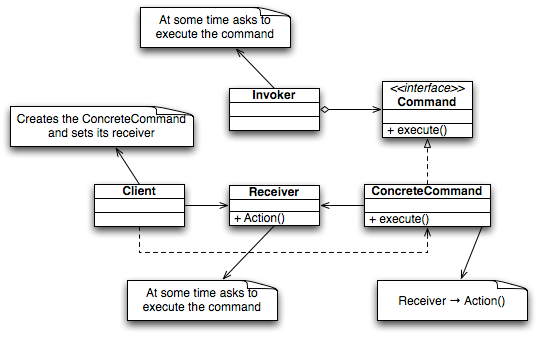
image

Figure 01. Class diagram of the Command Pattern. Ref: http://en.wikipedia.org/wiki/Command_pattern

As can be seen in the previous figure, the elements that characterize the Command Pattern are:

  • An invoker
  • A command
  • A receiver

The invoker is the one that will execute any Command that is set to it.

The command is the interface that will have the generic methods –commands- that will be specifically implemented by the classes that extend it.

The receiver is the class that will actually have all the logic required to execute any of the commands invoked by the invoker.

As we can see here, we are generating actual objects (ConcreteCommand objects) that will represent the commands that need to be executed by the receiver, as the definition of this pattern states.

Scenario

We need to implement a system that will either submit or update orders.

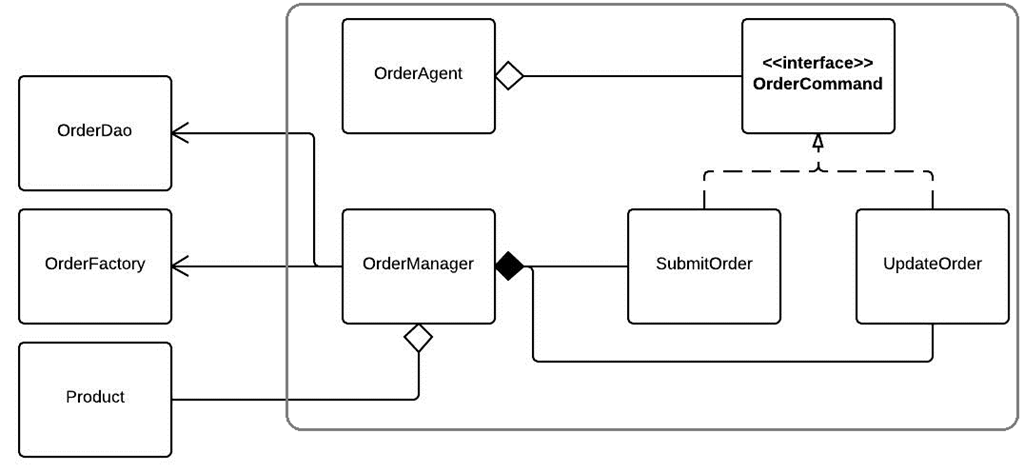
The solution proposed can be seen in the following class diagram:

image

Figure 02. Class diagram of the solution proposed for the study case.

In this diagram, these are our Command Pattern elements:

  • Invoker: OrderAgent class
  • Command: OrderCommand interface
  • Receiver: OrderManager class

The OrderAgent class has the following code:

OrderAgent.java

package chris.desingpatterns.command; import chris.desingpatterns.command.commmands.OrderCommand; public class OrderAgent { private OrderCommand command; /** * Method that will store all the * orders places by an Agent. * * @param command */ public void sendCommand(OrderCommand command){ this.command = command; command.excecute(); } public void undoCommand() { if(command != null){ command.undo(); } } }

As we can see here the agent will be capable of execute to actions –commands-:

  • sendCommand() to execute the command.
  • undoCommand() to revert the command executed.

The command interface looks like this:

OrderCommand.java

package chris.desingpatterns.command.commmands; public interface OrderCommand { /** * This is a general method that will * execute an action in a Receiver, * in this case the OrderManager class. */ void excecute(); /** * Method that will revert an action * that could be processed at the end. * */ void undo(); }

One of the concrete commands is:

UpdateOrder.java

package chris.desingpatterns.command.commmands; import chris.desingpatterns.command.receivers.OrderManager; public class UpdateOrder implements OrderCommand { private OrderManager orderManager; public UpdateOrder(OrderManager orderManager) { this.orderManager = orderManager; } /** * {@inheritDoc} */ public void excecute() { orderManager.update(); } /** * {@inheritDoc} * */ public void undo() { orderManager.restoreOriginal(); } }

And the class that have all the logic to execute all the actions required by the invoker is:

OrderManager.java

package chris.desingpatterns.command.receivers; import java.util.List; import org.apache.log4j.Logger; import chris.desingpatterns.command.dao.OrderDao; import chris.desingpatterns.command.pojos.Order; import chris.desingpatterns.command.pojos.OrderFactory; import chris.desingpatterns.command.pojos.Product; public class OrderManager { private static Logger log = Logger.getLogger(OrderManager.class); private OrderDao dao; private OrderFactory orderFactory; private List<Product> products; private Order orderFound; private Order currentOrder; public OrderManager() { dao = OrderDao.getInstance(); orderFactory = OrderFactory.getInstance(); } /** * Method that will replace an existing order * by a new one but that will preserve the same * ID as the old order. * */ public void update() { if(orderFound != null){ String oldOrderId = orderFound.getId(); orderFactory.setProducts(products); Order newOrder = orderFactory.createOrder(); newOrder.setId(oldOrderId); currentOrder = newOrder; dao.update(oldOrderId, newOrder); }else{ log.warn("Order not found"); } } /** * Method that will create a new Order * that will be saved by the DAO. * */ public void submit() { orderFactory.setProducts(products); Order newOrder = orderFactory.createOrder(); currentOrder = newOrder; dao.store(newOrder); } /** * Method that will remove an order * that was saved by the DAO. * */ public void remove() { String id = currentOrder.getId(); dao.delete(id); } /** * Method that will get an order * that was cached. * */ public void restoreOriginal() { String id = currentOrder.getId(); currentOrder = dao.getCached(id); } /** * Method that will retrieve an order * that was saved by the DAO. * * @param id */ public void findOrder(String id) { orderFound = dao.get(id); } public void setProducts(List<Product> products) { this.products = products; } public Order getCurrentOrder() { return currentOrder; } }

And the class that will run or study case (in Command Pattern terms: the Client) is:

Main.java

package chris.desingpatterns.command; import java.util.ArrayList; import java.util.List; import chris.desingpatterns.command.commmands.OrderCommand; import chris.desingpatterns.command.commmands.SubmitOrder; import chris.desingpatterns.command.commmands.UpdateOrder; import chris.desingpatterns.command.pojos.Order; import chris.desingpatterns.command.pojos.Product; import chris.desingpatterns.command.receivers.OrderManager; public class Main { /** * @param args */ public static void main(String[] args) { /********* PRODUCTS *************/ Product tv = new Product(); tv.setDescription("TV Sony"); tv.setName("TV"); Product radio = new Product(); radio.setDescription("Radio Panasonic"); radio.setName("RADIO"); Product telephone = new Product(); telephone.setDescription("iPhone Phone"); telephone.setName("TELEPHONE"); /*********************************/ OrderAgent agent = new OrderAgent(); List<Product> productsA = new ArrayList<Product>(); productsA.add(tv); productsA.add(radio); OrderManager orderManagerA = new OrderManager(); orderManagerA.setProducts(productsA); // SUBMIT ORDER 1 System.out.println(".:.SUBMIT ORDER 1.:."); OrderCommand submitCommand = new SubmitOrder(orderManagerA); agent.sendCommand(submitCommand); print(orderManagerA.getCurrentOrder()); //REVERT ORDER SUBMITED System.out.println(".:.UNDO SUBMIT ORDER 1.:."); agent.undoCommand(); //New Order to Submit List<Product> productsB = new ArrayList<Product>(); productsB.add(telephone); productsB.add(tv); productsB.add(radio); OrderManager orderManagerB = new OrderManager(); orderManagerB.setProducts(productsB); // Submit ORDER 2 System.out.println(".:.SUBMIT ORDER 2.:."); submitCommand = new SubmitOrder(orderManagerB); agent.sendCommand(submitCommand); print(orderManagerB.getCurrentOrder()); String id = "1"; OrderManager orderManagerC = new OrderManager(); orderManagerC.findOrder(id); List<Product> productsC1 = new ArrayList<Product>(); productsC1.add(telephone); orderManagerC.setProducts(productsC1); //Update ORDER 1 System.out.println(".:.UPDATE ORDER 1.:."); OrderCommand updateCommand = new UpdateOrder(orderManagerC); agent.sendCommand(updateCommand); print(orderManagerC.getCurrentOrder()); //Submit ORDER 3 System.out.println(".:.SUBMIT ORDER 3.:."); OrderManager orderManagerD = new OrderManager(); List<Product> productsD = new ArrayList<Product>(); productsD.add(radio); productsD.add(telephone); orderManagerD.setProducts(productsD); submitCommand = new SubmitOrder(orderManagerD); agent.sendCommand(submitCommand); print(orderManagerD.getCurrentOrder()); //Update ORDER 3 System.out.println(".:.UPDATE ORDER 3.:."); OrderManager orderManagerE = new OrderManager(); List<Product> productsE = new ArrayList<Product>(); productsE.add(telephone); productsE.add(radio); productsE.add(tv); orderManagerE.setProducts(productsE ); orderManagerE.findOrder("3"); updateCommand = new UpdateOrder(orderManagerE); agent.sendCommand(updateCommand); print(orderManagerE.getCurrentOrder()); //UNDO Update ORDER 3 System.out.println(".:.UNDO UPDATE ORDER 3.:."); agent.undoCommand(); print(orderManagerE.getCurrentOrder()); } private static void print(Order order){ if(order != null){ System.out.println("----------------------------"); System.out.println("Products for Order["+order.getId()+"]: " ); for(Product p : order.getProducts()){ System.out.println("- " + p.getName()); } System.out.println("----------------------------"); } } }

That is it!

To download the code click in the following link:

Command Pattern

Do you have any recommendations or amendments to be done, please let me know to improve this post!

Factory Method and Singleton Patterns

Definition

Factory Method

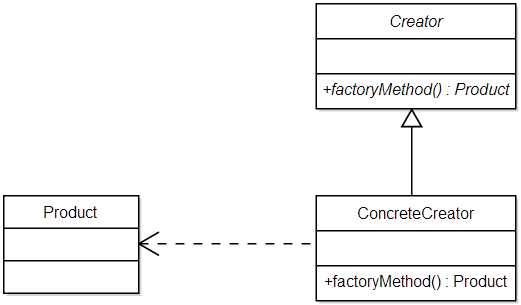
The Factory Method Pattern defines an interface for creating an object, but lets subclass decide which class to instantiate. Factory Method lets a class defer instantiation to subclasses.

image

Figure 01. Class diagram of the Factory Method. Ref:http://en.wikipedia.org/wiki/Factory_method_pattern

Singleton

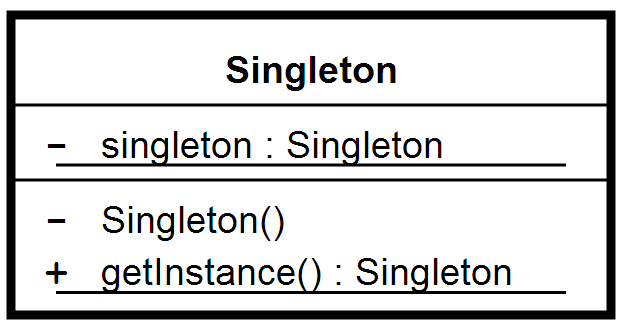
The Singleton Pattern ensures a class has only one instance, and provides a global point of access to it.

image

Figure 02. Singleton class Ref: http://en.wikipedia.org/wiki/Singleton_pattern

Scenario

One of the applications of the Singleton Pattern is in a Factory class, due to the fact that factories don’t need to be instantiated multiple times and just one factory can create as many objects as required, we can save memory in the system making the Factory a Singleton.

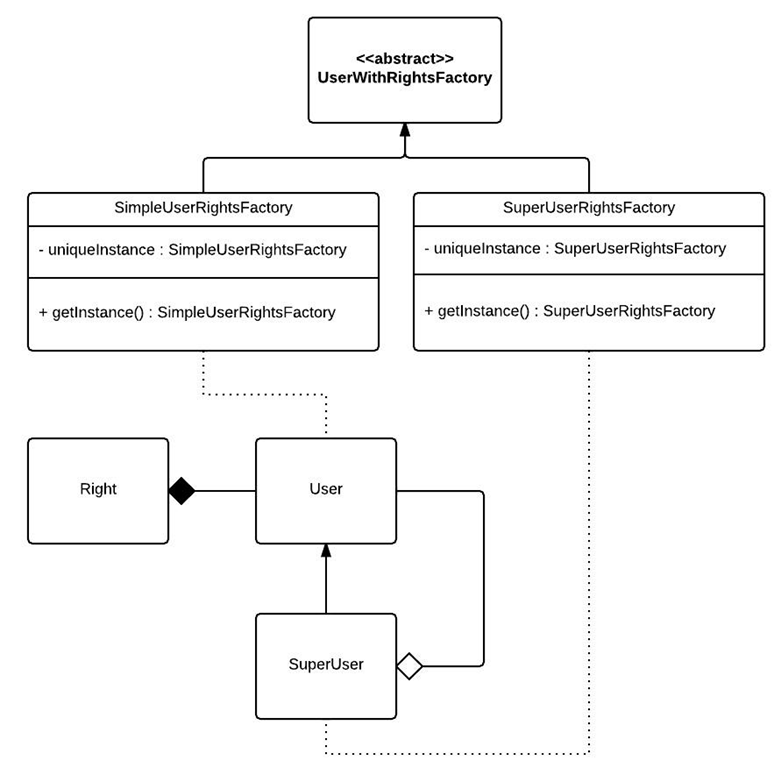
For this reason we will create a small factory that will create two (or can be more) types of users:

  • A simple user
  • A super user

What is going to differentiate these users is going to be the rights attached to them:

  • A simple user will have these rights: Review and Edit customers.
  • A super user will have these rights: Remove and Create customers.

For the design of the proposed study case we will refer to the following class diagram:

image

Figure 03. Class diagram of the solution proposed

As it can be seen in this figure, we will have two factories that will create a specific type of user, and an abstract factory that will set all the common data for both factories that extends the abstract class UserWithRightsFactory.

UserWithRightsFactory.java

package chris.desingpatterns.factorysingleton.factory;

import java.util.ArrayList;
import java.util.List;

import chris.desingpatterns.factorysingleton.server.pojos.Right;

public abstract class UserWithRightsFactory {

protected abstract User getNewUser();

public User createUser(){
User user = getNewUser();

List<Right> rights = new ArrayList<Right>();

setBasicRights(rights);

if(user instanceof SuperUser){
setSuperRights(rights);
}

user.setRights(rights);
return user;
}

private void setBasicRights(List<Right> rights){
//Basic rights
rights.add(Right.REVIEW_CUSTOMER);
rights.add(Right.EDIT_CUSTOMER);
}

private void setSuperRights(List<Right> rights){
//Super rights
rights.add(Right.REMOVE_CUSTOMER);
rights.add(Right.CREATE_CUSTOMER);
}

}
The specific factories that will create new Customer objects, are the ones that will implement the Singleton Pattern; the main characteristic of a singleton class is that there is an static method that is going to verify if an instance of this class was already created or not, if is the case that the instance of the singleton was already created, then this static method will just return the existing singleton object, otherwise it will create a new instance of the singleton; usually the name of this method in a Singleton class is: getInstance().
 
In the following snippet it can be seen how a singleton is implemented.
 
SimpleUserRightsFactory.java
 
package chris.desingpatterns.factorysingleton.factory;


public class SimpleUserRightsFactory extends UserWithRightsFactory {

private static SimpleUserRightsFactory uniqueInstance;

private SimpleUserRightsFactory() {}

public static SimpleUserRightsFactory getInstance(){
if(uniqueInstance == null){
uniqueInstance = new SimpleUserRightsFactory();
}

return uniqueInstance;
}

protected User getNewUser() {
return new User();
}

}
And the class that will run our scenario:
 
Main.java
 

package chris.desingpatterns.factorysingleton;

import java.util.ArrayList;
import java.util.List;

import chris.desingpatterns.factorysingleton.factory.SimpleUserRightsFactory;
import chris.desingpatterns.factorysingleton.factory.SuperUser;
import chris.desingpatterns.factorysingleton.factory.SuperUserRightsFactory;
import chris.desingpatterns.factorysingleton.factory.User;
import chris.desingpatterns.factorysingleton.factory.UserWithRightsFactory;
import chris.desingpatterns.factorysingleton.server.pojos.Address;
import chris.desingpatterns.factorysingleton.server.pojos.ContactInformation;
import chris.desingpatterns.factorysingleton.server.pojos.Identification;
import chris.desingpatterns.factorysingleton.server.pojos.IdentificationDocument;
import chris.desingpatterns.factorysingleton.server.pojos.Name;

public class Main {

public static void main(String... args){
Name name = new Name();
name.setFirstName("Christian");
name.setLastName("Roman");

Address address = new Address();
address.setCity("La Paz");
address.setCountry("Bolivia");
address.setHouseNumber("333");
address.setStreet("Ocobaya");

Identification identifcation = new Identification();
identifcation.setDocument(IdentificationDocument.ID);
identifcation.setNumber("123456789");

ContactInformation contactInformation = new ContactInformation();
contactInformation.setEmail("cralcubo@yahoo.com");
contactInformation.setTelephone("0652630333");

User simpleUser = createSimpleUser(name, address,
identifcation, contactInformation);

Name nameB = new Name();
nameB.setFirstName("Karl");
nameB.setLastName("Taylor");

Address addressB = new Address();
addressB.setCity("Utrecht");
addressB.setCountry("Netherlands");
addressB.setHouseNumber("2");
addressB.setStreet("Zijdebalenstraat");

Identification identificationB = new Identification();
identificationB.setDocument(IdentificationDocument.DRIVING_LICENSE);
identificationB.setNumber("ABCD1234564");

ContactInformation contactInformationB = new ContactInformation();
contactInformationB.setEmail("karl@taylor.com");
contactInformationB.setTelephone("0612345678");

User simpleUserB = createSimpleUser(nameB, addressB,
identificationB, contactInformationB);

Name nameC = new Name();
nameC.setFirstName("Anna");
nameC.setLastName("Korte");

Address addressC = new Address();
addressC.setCity("Groningen");
addressC.setCountry("Netherlands");
addressC.setHouseNumber("568");
addressC.setStreet("Boliviastraat");

Identification identificationC = new Identification();
identificationC.setDocument(IdentificationDocument.PASSPORT);
identificationC.setNumber("9875631XX");

ContactInformation contactInformationC = new ContactInformation();
contactInformationC.setEmail("anna@gmail.com");
contactInformationC.setTelephone("0652369875");

User superUser = createSuperUser(nameC, addressC,
identificationC, contactInformationC);
List<User> usersManged = new ArrayList<User>();
usersManged.add(simpleUser);
usersManged.add(simpleUserB);
((SuperUser)superUser).setUsersManged(usersManged );

//Optionally you could print the info of all the users
//created by the factories.
//printAllUsersinformation(simpleUser, simpleUserB, superUser);


}

/**
* Method that will print all the information of the
* users created in the Main method.
*
* @param users
*/
private static void printAllUsersinformation(User ...users) {
for(User user : users){
String userType = (user instanceof SuperUser) ? "SUPER USER" : "USER";
System.out.println(".:. " + userType + " .:.");
System.out.println(user.toString());
if(user instanceof SuperUser){
System.out.println("Users Managed: ");
for(User simpleUser : ((SuperUser)user).getUsersManged()){
System.out.println("- " + simpleUser.getName().getFirstName());
}
}
}

}

/**
* Method that will create a Simple User.
*
* @param name
* @param address
* @param identification
* @param contactInformation
* @return
*/
private static User createSimpleUser(Name name,
Address address,
Identification identification,
ContactInformation contactInformation){

UserWithRightsFactory simpleUserRightsFactory =
SimpleUserRightsFactory.getInstance();
return createUser(simpleUserRightsFactory, name, address,
identification, contactInformation);
}

/**
* Method that will create a Super User.
*
* @param name
* @param address
* @param identification
* @param contactInformation
* @return
*/
private static User createSuperUser(Name name,
Address address,
Identification identification,
ContactInformation contactInformation){

UserWithRightsFactory superUserRightsFactory =
SuperUserRightsFactory.getInstance();
return createUser(superUserRightsFactory, name, address,
identification, contactInformation);
}

/**
* General Method that will create any type of User.
*
* @param factory
* @param name
* @param address
* @param identification
* @param contactInformation
* @return
*/
private static User createUser(UserWithRightsFactory factory,
Name name,
Address address,
Identification identification,
ContactInformation contactInformation){

System.out.println("Factory class: " + factory +
" created user: " + name.getFirstName());

User user = factory.createUser();
user.setName(name);
user.setAddress(address);
user.setIdentification(identification);
user.setContactInformation(contactInformation);

return user;
}

}
That is it!
 
To download the code click in the following link:
 
Do you have any recommendations or amendments to be done, please let me know to improve this post!

Abstract Factory Pattern

Definition

The Abstract Factory Pattern provides an interface for creating families of related or dependent objects without specifying their concrete classes.

Figure 01. Abstract Factory class diagram. Ref: http://www.oodesign.com/abstract-factory-pattern.html

Scenario

A telecom company wants to have a system that could register the different Internet offers that they have for their customers. Between all their requirements, they mentioned that with the time new internet offers may come and that for each internet plan the user have to have also a router with capabilities according to the plan that they choose. The routers are provided by the internet company.

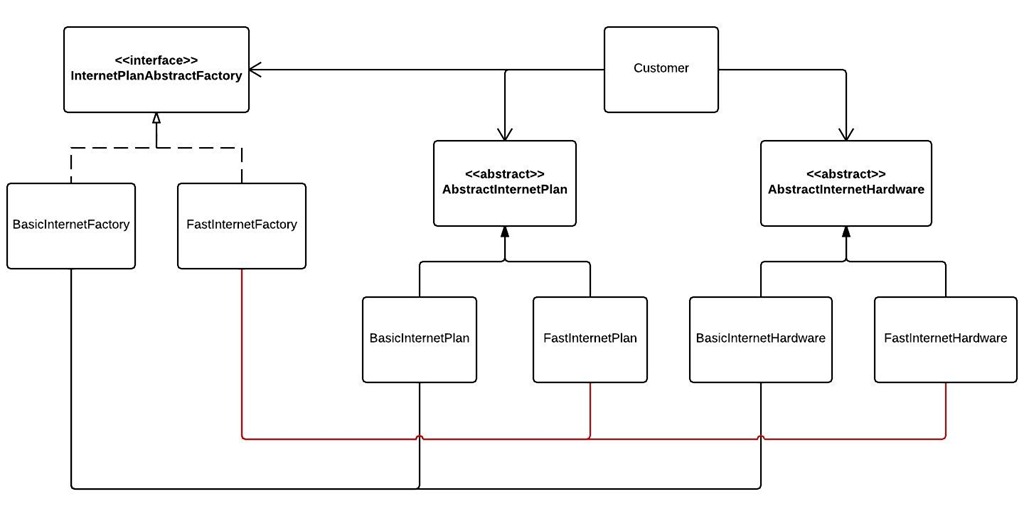
Reviewing the requirements mentioned, we noticed that the costumer that choose an internet plan is linked to a router to have the internet connection. Because there can be different internet plans, that can have different routers, we can use a factory that is going to link both products (products in the sense of a Factory are the Objects that are created from it) : The Internet Plan and the Internet Hardware.

AbstractFactoryPattern

Figure 02. Class diagram of the solution proposed for the case study *

*Click on the figure to magnify it

As it can be seen in the previous figure our Abstract Factory (InternetPlanAbstractFactory) is going to be the responsible to delegate the creation of specific products by specific factories (BasicInternetFactory and FastInternetFactory).

InternetPlanAbstractFactory

package chris.desingpatterns.factory.factories;

import chris.desingpatterns.factory.products.hardware.AbstractInternetHardware;
import chris.desingpatterns.factory.products.plans.AbstractInternetPlan;

public interface InternetPlanAbstractFactory {
    /**
     * Method that will create an Internet Plan.
     * 
     * @return
     */
    public AbstractInternetPlan createInternetPlan();
    
    /**
     * Method that will create an Internet Hardware
     * 
     * @return
     */
    public AbstractInternetHardware createInternetHardware();

}

In the previous snippet AbstractInternetPlan and AbstractInternetHardware are the abstract products that can be created by our factories. For example the FastInternetFactory that will create products related to a Fast Internet Plan would look like this:

FastInternetFactory

package chris.desingpatterns.factory.factories;

import chris.desingpatterns.factory.products.hardware.AbstractInternetHardware;
import chris.desingpatterns.factory.products.hardware.FastInternetHardware;
import chris.desingpatterns.factory.products.plans.FastInternetPlan;
import chris.desingpatterns.factory.products.plans.AbstractInternetPlan;

public class FastInternetFactory implements InternetPlanAbstractFactory {
    
    /**
     * {@inheritDoc}
     */
    public AbstractInternetPlan createInternetPlan() {
        return new FastInternetPlan();
    }
    
    /**
     * {@inheritDoc}
     */
    public AbstractInternetHardware createInternetHardware() {
        return new FastInternetHardware();
    }

}

Now this specific factory will create these products: FastInternetPlan and FastInternetHardware. If the requirements change it is easier to modify the factories to get the products that we need.

The client in this case that will use a Factory to get the right products is the Customer class:

Customer

package chris.desingpatterns.factory;

import chris.desingpatterns.factory.factories.InternetPlanAbstractFactory;
import chris.desingpatterns.factory.products.hardware.AbstractInternetHardware;
import chris.desingpatterns.factory.products.plans.AbstractInternetPlan;

public class Customer {
    private String name;
    private InternetPlanAbstractFactory internetFactory;
    private AbstractInternetHardware internetHardware;
    private AbstractInternetPlan internetPlan;
    
    public Customer(String name) {
        this.name = name;
    }
    
    /**
     * Method that will set the specific
     * Internet plan and Internet hardware
     * for a customer.
     * 
     */
    public void setUpInternetService() {
        internetHardware = internetFactory.createInternetHardware();
        internetPlan = internetFactory.createInternetPlan();
    }

    public String getName() {
        return name;
    }
    
    public void setName(String name) {
        this.name = name;
    }
    
    public void setInternetFactory(InternetPlanAbstractFactory internetFactory) {
        this.internetFactory = internetFactory;
    }

    public AbstractInternetHardware getInternetHardware() {
        return internetHardware;
    }

    public AbstractInternetPlan getInternetPlan() {
        return internetPlan;
    }

}

As can be seen here the client (Customer) just relies in abstract classes or interfaces:

  • InternetPlanAbstractFactory
  • AbstractInternetHardware
  • AbstractInternetPlan

Here fits perfectly well the Design Principle:

Depend upon abstractions. Do not depend upon concrete classes.

Finally the main class that will run this case study:

Main

package chris.desingpatterns.factory;

import chris.desingpatterns.factory.factories.BasicInternetFactory;
import chris.desingpatterns.factory.factories.FastInternetFactory;
import chris.desingpatterns.factory.factories.InternetPlanAbstractFactory;
import chris.desingpatterns.factory.products.hardware.AbstractInternetHardware;
import chris.desingpatterns.factory.products.plans.AbstractInternetPlan;

public class Main {

    /**
     * Method that will run the implementation of the 
     * Abstract Factory Pattern.
     * 
     * For this example we will have two customers:
     * - CustomerA with Basic Internet Plan.
     * - CustomerB with Fast Internet. 
     * 
     * Thanks to the factory, the required characteristics
     * of the Internet plan such as Internet Speed and costs
     * are correctly determined in the factories, without 
     * setting this extra information in other methods.
     * 
     * Factories are easy to maintain in case a New Internet
     * plan would be required, without changing any other 
     * classes or methods.
     * 
     * @param args
     */
    public static void main(String[] args) {
        //Customer A: 
        Customer customerA = new Customer("Christian");
        // Customer choose the Internet plan: Basic Internet
        setInternetPlan(customerA, new BasicInternetFactory());
        // The Serial Number of the Router 
        String serialNumberA = "11233654564AXB";
        setHardwareSerial(customerA, serialNumberA);
        printInfo(customerA);
        
        //Customer B:
        Customer customerB = new Customer("Kasia");
        // Customer choose Fast Internet
        setInternetPlan(customerB, new FastInternetFactory());
        // The serial number of the router
        String serialNumberB = "PSN123456";
        setHardwareSerial(customerB, serialNumberB);
        printInfo(customerB);
    }
    
    
    private static void setInternetPlan(Customer customer, 
            InternetPlanAbstractFactory internetFactory){
        
        customer.setInternetFactory(internetFactory);
        customer.setUpInternetService();
        
    }
    
    private static void setHardwareSerial(Customer customer, String serialNumber){
        AbstractInternetHardware hardwareOwned = customer.getInternetHardware();
        hardwareOwned.setSerialNumber(serialNumber);
    }
    
    private static void printInfo(Customer customer) {
        System.out.println("--------------------------------------");
        System.out.println("Hello: " + customer.getName());
        AbstractInternetPlan internetPlan = customer.getInternetPlan();
        
        System.out.println("You have chosen the following plan: " + 
                internetPlan.getName());
        
        System.out.println(internetPlan.getDescription());
        AbstractInternetHardware hardware = customer.getInternetHardware();
        
        System.out.println("You will receive the following device from us: " + 
                hardware.getModel() + " S/N: " + hardware.getSerialNumber());
        
        System.out.println(hardware.getCapabilities());
        System.out.println("TOTAL COST: " + internetPlan.getCost() + " Euros");
        System.out.println("--------------------------------------");
    }

}

That is it folks Hot smile!
As always, you can download the source code and dig into it to see how it works and maybe modify it to see how flexible de application of this pattern is:

Abstract Factory Pattern

Do you have any recommendations or amendments to be done, please let me know to improve this post!

Decorator Pattern

Definition

The Decorator Pattern attaches additional responsibilities to an object dynamically. Decorators provide a flexible alternative to subclassing for extending functionality.

image

Figure 01. Decorator Pattern class diagram. Ref: http://en.wikipedia.org/wiki/Decorator_pattern

Scenario

Crazy Phones (a mobile phone company provider) wants a web shop on which its customers can choose any of all the offers that they have on mobile services. For now they have the following offers:

  • SIM only plans, where customers can make and receive calls.
  • SMS plans, where customers can send and receive sms’s.
  • Internet, where customers can also have internet in their phones.

One of the main requirements is that these plans can be combined, something like: SIM + SMS, SIM + Internet, etc, being SIM only the mandatory basic plan (no SIM no calls, no sms’s, no internet… makes sense Smile with tongue out)
Another important requirement is that the plans can change from time to time, so the design has to be flexible to changes.

For this scenario, we could propose the following solution:

image

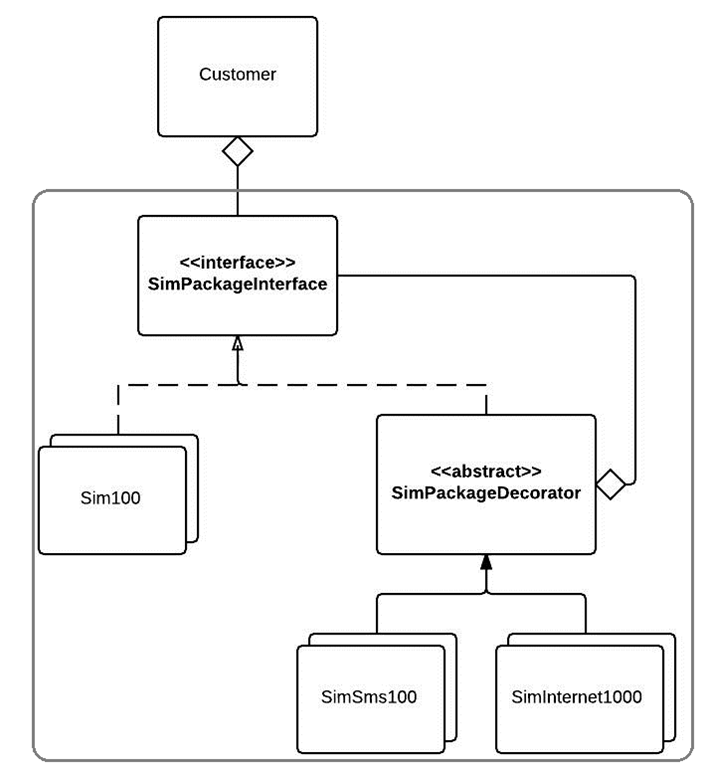
Figure 02. Class diagram of the solution proposed for this scenario.

As it can be seen in this diagram we will apply the Decorator Pattern, because this pattern fits perfectly well on the requirements specified.

  1. Easy to extend to different types of plans (SimSms500, Sim1000, Internet 2GB, etc)
  2. The MOST IMPORTANT, the basic plan (SimXXX) can be decorated with other plans on it.

This can be better understood checking the code implemented.

Lets first check the SimPackageInterface:

SimPackageInterface.java

package chris.desingpatterns.decorator.sim;

public interface SimPackageInterface {
    
    /**
     * Method that will return the name of the
     * SIM Package plan.
     * @return
     */
    String getName();
    
    /**
     * Method that will return the description
     * of the package plan.
     * 
     * @return
     */
    String getDescription();
    
    /**
     * Method that will return the cost
     * for the SIM Plan.
     * @return
     */
    double getCost();

}

This interface is the one that expose all the required methods for a SIM plan object.

The decorator looks like this:

SimPackageDecorator.java

package chris.desingpatterns.decorator.sim.decorators;

import chris.desingpatterns.decorator.sim.SimPackageInterface;

public abstract class SimPackageDecorator implements SimPackageInterface {
    private SimPackageInterface simPackage;
    
    /**
     * With this constructor we will force all the 
     * classes that extend it, to set a Sim Package
     * class to decorate it.
     * 
     * @param simPackage
     */
    public SimPackageDecorator(SimPackageInterface simPackage){
        this.simPackage = simPackage;
    }
    
    public SimPackageInterface getSimPackage() {
        return simPackage;
    }

}

The Decorator (as the pattern describes it) will need the class that needs to be decorated (in this case any class that implements the SimPackageInterface)

One of the classes that extend the decorator is the SimInternet500 class, this class will Decorate any class that extends the SimPackageInterface to add an extra Internet service to the SIM plan.

SimInternet500.java

package chris.desingpatterns.decorator.sim.decorators.internet;

import chris.desingpatterns.decorator.sim.SimPackageInterface;
import chris.desingpatterns.decorator.sim.decorators.SimPackageDecorator;

public class SimInternet500 extends SimPackageDecorator {

    public SimInternet500(SimPackageInterface simPackage) {
        super(simPackage);
    }
    
    /**
     * {@inheritDoc}
     */
    public String getName() {
        return getSimPackage().getName() + " + Internet 500";
    }
    
    /**
     * {@inheritDoc}
     */
    public String getDescription() {
        return getSimPackage().getDescription() + 
                " + 500 MB of internet at max 2 Mbps";
    }
    
    /**
     * {@inheritDoc}
     */
    public double getCost() {
        return getSimPackage().getCost() + 10.00;
    }

}  

This class attach additional information (methods: getName() and getDescritpion()) and additional functionality (creating an extra calculation of prices in getCost()) thanks to the use of the Decorator pattern without changing or extending the classes that directly extend the interface SimPackageInterface.

The class that is running this scenario is:

Main.java

package chris.desingpatterns.decorator;

import chris.desingpatterns.decorator.sim.Sim100;
import chris.desingpatterns.decorator.sim.Sim200;
import chris.desingpatterns.decorator.sim.SimPackageInterface;
import chris.desingpatterns.decorator.sim.SimUnlimited;
import chris.desingpatterns.decorator.sim.decorators.internet.SimInternet500;
import chris.desingpatterns.decorator.sim.decorators.internet.SimInternetUnlimited;
import chris.desingpatterns.decorator.sim.decorators.sms.SimSmsUnlimited;

public class Main {

    /**
     * In this example we will have three customers
     * 
     * - Customer A just needs to do calls all the time (SIM Unlimited)
     * - Customer B order a SIM for calling (SIM 200) + 
     *   Unlimited SMS's + Internet 500
     * - Customer C wants more Internet than anything else Unlimited 
     *      Internet, so he choose the basic calls plan (SIM 100). 
     *   He does not need SMS's because he will use Internet to send SMS's
     *    
     * @param args
     */
    public static void main(String[] args) {
        
        //Customer A
        Customer customerA = new Customer("Christian");
        SimPackageInterface simUnlimited = new SimUnlimited();
        customerA.setSimPackage(simUnlimited);
        printInfo(customerA);
        
        //Customer B
        Customer customerB = new Customer("Alejandro");
        SimPackageInterface sim200 = new Sim200();
        sim200 = new SimSmsUnlimited(sim200);
        sim200 = new SimInternet500(sim200);
        customerB.setSimPackage(sim200);
        printInfo(customerB);
        
        //Customer C
        Customer customerC = new Customer("Marcelo");
        SimPackageInterface simInternet = new Sim100();
        simInternet = new SimInternetUnlimited(simInternet);
        customerC.setSimPackage(simInternet);
        printInfo(customerC);
        
    }
    
    /**
     * Method that will print the customer info
     * + the SIM package that he chose.
     * 
     * @param customer
     */
    private static void printInfo(Customer customer) {
        SimPackageInterface simPackage = customer.getSimPackage();
        System.out.println("=========================================");
        System.out.println(customer.getName() + " ordered: ");
        if(simPackage != null){
            System.out.println("- Name of the package: " + 
                                simPackage.getName());
            System.out.println("- The description: " + 
                                simPackage.getDescription());
            System.out.println("- The cost: " + 
                                simPackage.getCost() + " Euros");
        }
        System.out.println("=========================================");
        
    }

}

That is it!
Starting a new mobile phone contract or renewing an existing one usually will give you these options to select the contract that best fits your necessities… so there we have here an application of the Decorator Pattern to fulfill these requirements.

Do you want to run the code by yourself? Then download the source code here:

Decorator Pattern

Do you have any recommendations or amendments to be done, please let me know to improve this post!

Observer Pattern


Definition

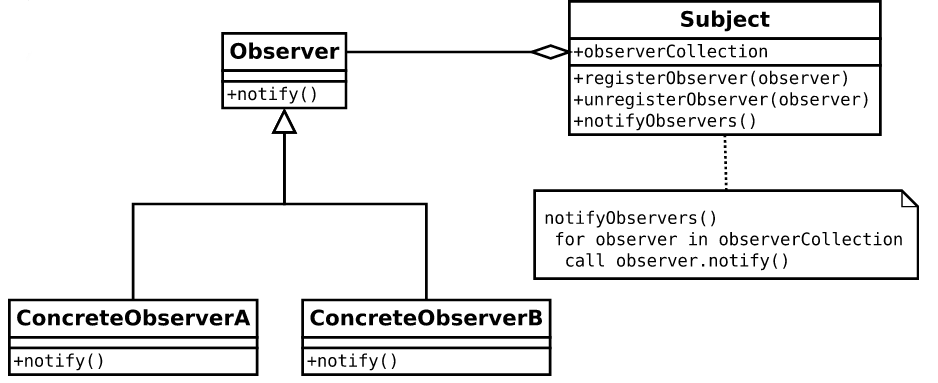
The Observer Pattern defines a one-to-many dependency between objects so that when one object changes state, all of its dependents are notified and updated automatically.

image

Figure 01. Observer Pattern class diagram. Ref: http://en.wikipedia.org/wiki/Observer_pattern

Scenario

We need to simulate a Horse Race, on which we need to keep the information updated in a website once all the results of the horse race are known and also we need to update a Data Base to keep history of the result of the race.

Class Diagram

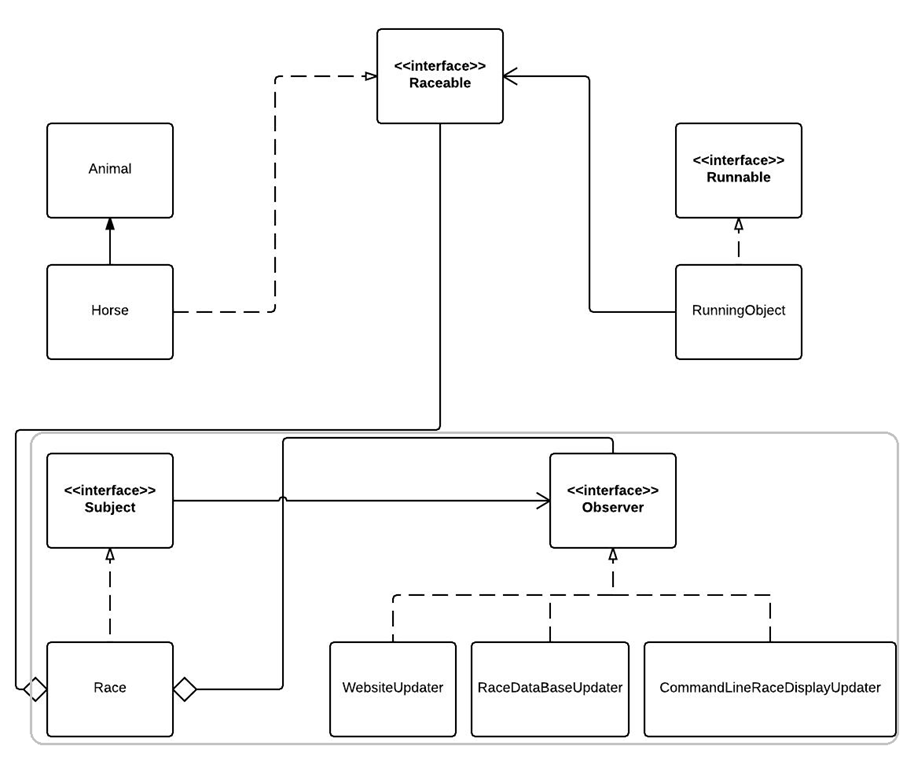
image

Figure 02. Class diagram of the case of study

As it can be seen in the previous figure, the Observer Pattern was implemented to keep the WebsiteUpdater, RaceDataBaseUpdater and ComandLineRaceDisplayUpdater updated when the race is over, as it was part of the requirement.

The Subject is the Race class, because this class is the one that is keeping record of all the horses that reach the Final line and is the one that is going to accept any Observer that want to register themselves and keep them updated.

Subject.java

package chris.desingpatterns.observer.subject;

import chris.desingpatterns.observer.observers.Observer;

public interface Subject {
    
    void registerObserver(Observer o);
    void removeObserver(Observer o);
    void notifyObservers();

}

Race.java

package chris.desingpatterns.observer.subject;

import java.util.ArrayList;
import java.util.List;

import chris.desingpatterns.observer.competitor.Raceable;
import chris.desingpatterns.observer.observers.Observer;

public class Race implements Subject {
    
    private int numberOfLaps;
    private int circuitPerimeter;
    private List<Raceable> competitors;
    private List<Raceable> raceRegister;

    //Here will be registered all the classes that want to get updates from Race
    private List<Observer> observers;
    
    public Race(int numberOfLaps, int circuitPerimeter) {
        this.numberOfLaps = numberOfLaps;
        this.circuitPerimeter = circuitPerimeter;
        raceRegister = new ArrayList<Raceable>();
        competitors = new ArrayList<Raceable>();
        observers = new ArrayList<Observer>();
    }
   
    public void registerObserver(Observer o) {
        observers.add(o);
    }

    public void removeObserver(Observer o) {
        observers.remove(o);
    }
    
    /**
     * This method is the one that will 
     * notify all the observer that the race
     * was over, so they can proceed to do 
     * whatever they need with the information
     * provided.
     */
    public void notifyObservers() {
        for(Observer o : observers){
            o.update(raceRegister);
        }
    }
    
    /**
     * Method that will wait to all the 
     * threads to get ready to run();
     * @throws InterruptedException
     */
    public synchronized void getReady() throws InterruptedException{
        this.wait();
    }
    
    /**
     * Method that will be triggered when all the
     * threads are ready to run()
     */
    public synchronized void startRace(){
        this.notifyAll();
    }
    
    /**
     * Method that will register all the objects
     * that have finished the competition.
     * @param raceable
     */
    public void reachedFinal (Raceable raceable){
        raceRegister.add(raceable);
        if(isRaceOver()){
            //Notify to update
            notifyObservers();
        }
    }
    
    public void setCompetitors(Raceable competitor){
        competitors.add(competitor);
    }
    
    /**
     * Method that will verify if all the 
     * competitors have cross the Final.
     * @return
     */
    private boolean isRaceOver(){
        return raceRegister.size() == competitors.size();
    }
    
    public int getNumberOfLaps() {
        return numberOfLaps;
    }

    public int getCircuitPerimeter() {
        return circuitPerimeter;
    }

}

The Observers are the ones that will be notified once the race is over, this will happen when the Subject class will execute the method notifyObservers() triggering the method update() in all the Observers.

Observer.java

package chris.desingpatterns.observer.observers;

import java.util.List;

import chris.desingpatterns.observer.competitor.Raceable;

public interface Observer {
    
    /**
     * This method will be triggered once our Race subject
     * has registered all the elements that were racing,
     * so by this way we can get the information about
     * positions and results of the race.
     * 
     * @param raceRegister
     */
    void update(List<Raceable> raceRegister);

}

CommandLineRaceDisplayUpdater.java

package chris.desingpatterns.observer.observers;

import java.util.List;

import chris.desingpatterns.observer.competitor.Raceable;
import chris.desingpatterns.observer.subject.Subject;

public class CommandLineRaceDisplayUpdater implements Observer {
    
    public CommandLineRaceDisplayUpdater(Subject race) {
        race.registerObserver(this);
    }
    
    /**
     * This method will display the results of the race.
     * 
     * @param raceRegister
     */
    public void display(List<Raceable> raceRegister){
        System.out.println("::::COMMAND LINE RACE DISPLAYER:::");
        System.out.println("The race is over!!!");
        
        System.out.println("The winner horse was: " 
        + raceRegister.get(0).getIdentification());
        
        System.out.println("These are the results: ");
        int i = 1;
        for(Raceable racingObject : raceRegister){
            System.out.println(i + "   " + racingObject.getIdentification() + "");
            
            System.out.println("    AVERAGE SPEED(Km/Hr): " 
                    + racingObject.getSpeed() 
                    + "| TOTAL TIME: " + racingObject.getTimeScored());
            
            i++;
        }
        System.out.println("Hope that you chose the winner horse :D!");
        System.out.println("::::::::::::::::::::::::::::::::::::");
    } 
        
    /**
     * This method will be triggered when the competition has 
     * finished.
     */
    public void update(List<Raceable> raceRegister) {
        display(raceRegister);
    }

}

And the class that will run the case of study:

Main.java

package chris.desingpatterns.observer;

import chris.desingpatterns.observer.competitor.Horse;
import chris.desingpatterns.observer.competitor.RunningObject;
import chris.desingpatterns.observer.observers.CommandLineRaceDisplayUpdater;
import chris.desingpatterns.observer.observers.RaceDataBaseUpdater;
import chris.desingpatterns.observer.observers.WebsiteUpdater;
import chris.desingpatterns.observer.subject.Race;

public class Main {

    /**
     * @param args
     * @throws InterruptedException 
     */
    public static void main(String[] args) throws InterruptedException {
        int numberOfLaps = 3;
        int circuitPerimeter = 1; // 1 Km
        Race race = new Race(numberOfLaps, circuitPerimeter);
        
        Horse horse1 = new Horse("Konan");
        race.setCompetitors(horse1);
        new Thread(new RunningObject(horse1, race)).start();
        
        Horse horse2 = new Horse("Achilles");
        race.setCompetitors(horse2);
        new Thread(new RunningObject(horse2, race)).start();
        
        Horse horse3 = new Horse("Brave Inca");
        race.setCompetitors(horse3);
        new Thread(new RunningObject(horse3, race)).start();
        
        Horse horse4 = new Horse("Black Beauty");
        race.setCompetitors(horse4);
        new Thread(new RunningObject(horse4, race)).start();
        
        Horse horse5 = new Horse("Trigger");
        race.setCompetitors(horse5);
        new Thread(new RunningObject(horse5, race)).start();
        
        //This are the objects that will update the information
        //once the race is over.
        new CommandLineRaceDisplayUpdater(race);
        new WebsiteUpdater(race);
        new RaceDataBaseUpdater(race);
        
        //Let's start the race
        System.out.println("Get ready...");
        Thread.sleep(1000);
        System.out.println("Get set...");
        Thread.sleep(1000);
        System.out.println("GO!!!");
        race.startRace();

    }

}

That is it! this design (thanks to the help of the Observable pattern) is very flexible (we can add or remove as many Observables as we want) and the Observers are not tightly coupled to the Subject.

So download the source code and enjoy the race!

Cheers!!!

Observer Pattern Code

Do you have any recommendations or amendments to be done, please let me know to improve this post!

Strategy Pattern

Definition

This pattern defines a family of algorithms,  encapsulates each one and make them interchangeable.

Strategy lets the algorithm vary independently from clients that use it.

image

Figure  01. Class diagram Ref: http://en.wikipedia.org/wiki/Strategy_pattern

Scenario

We need to design a Customer Promotion Tool for a cell phone company, on which per different seasons of the year or any special random day that the manager of the company came up in his mind, there is supposed to be a new promotion notified to the  customer when he wants to buy a new telephone so he/she can have a discount on his/her buying and by that way be happier 😀

Class Diagram

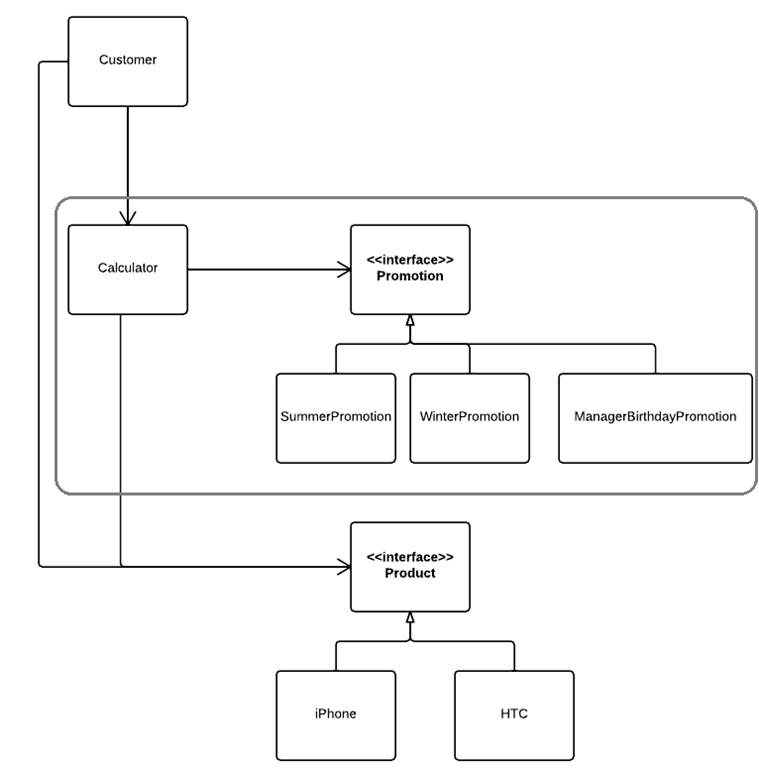
For the scenario described we have the following class diagram:

UntitledDocument (1)

Figure 02. Class diagram of the case of study.

The strategy pattern was applied on the calculation of the promotional prices as is shown in the previous figure. For this example the Context is the Calculator class and the Strategy is the Promotion interface.

To get an idea of the way that the pattern was implemented, this is the class that will do the product calculations:

ProductCalculator.class

package chris.desingpatterns.strategy.calculations;

import chris.desingpatterns.strategy.products.Product;
import chris.desingpatterns.strategy.promotions.Promotion;

public class ProductCalculator implements Calculator {
    private Product product;
    private Promotion promotion;

    public ProductCalculator(Product product) {
        this.product = product;
    }

    /**
     * {@inheritDoc}
     */
    public float getCalculation() {
        float productPrice = product.getProductPrice();
        float calculatedPrice = productPrice;

        if(promotion != null){
            float discount = promotion.getPromotionDisscount(productPrice);
            calculatedPrice -= discount;     
        }

        return calculatedPrice;
    }

    public Promotion getPromotion() {
        return promotion;
    }
    public void setPromotion(Promotion promotion) {
        this.promotion = promotion;
    }
    public Product getProduct() {
        return product;
    }
    public void setProduct(Product product) {
        this.product = product;
    }
}

And this is one of the implementations of the Promotions:

WinterPromotion.class

package chris.desingpatterns.strategy.promotions;

public class WinterPromotion implements Promotion {

    public String getPromotionName() {
        return "Winter Promotion";
    }

    public float getPromotionDisscount(float originalPrice) {
        return originalPrice * 30/100;
    }

    public String getPromotionInformation() {
        return "This is the Witer Promotion, because the weather " +
                "is cold and you are spending all your money paying " +
                "the gas bills, buy one of our products" +
                "and get an amazing discount of 30%";
    }

}

And finally the class that will run the case of study for this design pattern:

Main.class

package chris.desingpatterns.strategy;

import chris.desingpatterns.strategy.calculations.Calculator;
import chris.desingpatterns.strategy.calculations.ProductCalculator;
import chris.desingpatterns.strategy.customer.Customer;
import chris.desingpatterns.strategy.products.Htc;
import chris.desingpatterns.strategy.products.Product;
import chris.desingpatterns.strategy.promotions.BirthdayPromotion;
import chris.desingpatterns.strategy.promotions.Promotion;
import chris.desingpatterns.strategy.promotions.SummerPromotion;
import chris.desingpatterns.strategy.promotions.WinterPromotion;

public class Main {
    public static void main(String[] args) {
        Customer kasia = new Customer("Kasia");

        Product htcPhone = new Htc();
        kasia.buyProduct(htcPhone);

        // Case 01 Summer Promotion
        Promotion summerPromotion = new SummerPromotion();
        Calculator calculator = new ProductCalculator(htcPhone);
        calculator.setPromotion(summerPromotion);
        System.out.println(".:. Case 1: ");
        printInfo(kasia, htcPhone, calculator, summerPromotion);

        // Case 02 Winter Promotion
        Promotion winterPromotion = new WinterPromotion();
        calculator.setPromotion(winterPromotion);
        System.out.println(".:. Case 2");
        printInfo(kasia, htcPhone, calculator, winterPromotion);

        // Case 03 Birthday Promotion
        Promotion bdayPromotion = new BirthdayPromotion();
        calculator.setPromotion(bdayPromotion);
        System.out.println(".:. Case 3");
        printInfo(kasia, htcPhone, calculator, bdayPromotion);

    }

    private static void printInfo(Customer customer, Product product,
            Calculator calculator, Promotion promotion) {

        System.out.println("Hi " + customer.getName() + "!");
        System.out.println(promotion.getPromotionInformation());

        System.out.println("The original price of the: "
                + product.getProductName() + " is: "
                + product.getProductPrice() + "Euros");

        System.out.println("The price of your " + product.getProductName()
                + " thanks to the promotion: " + promotion.getPromotionName()
                + " will be: " + calculator.getCalculation() + "Euros");

        System.out.println("-----------------------------");
    }

}

As we can see, applying the Strategy Pattern makes the design more flexible in case a new promotion needs to be introduced, removed or simply updated, and the most important thing is that all these changes will not affect the way that the class ProductCalculator works. Modifications of promotions are done only under the Promotion classes.

If you want to check all the implementation of the case of study, download the code here:

Strategy Pattern Code

Do you have any recommendations or amendments to be done, please let me know to improve this post!